
Paint
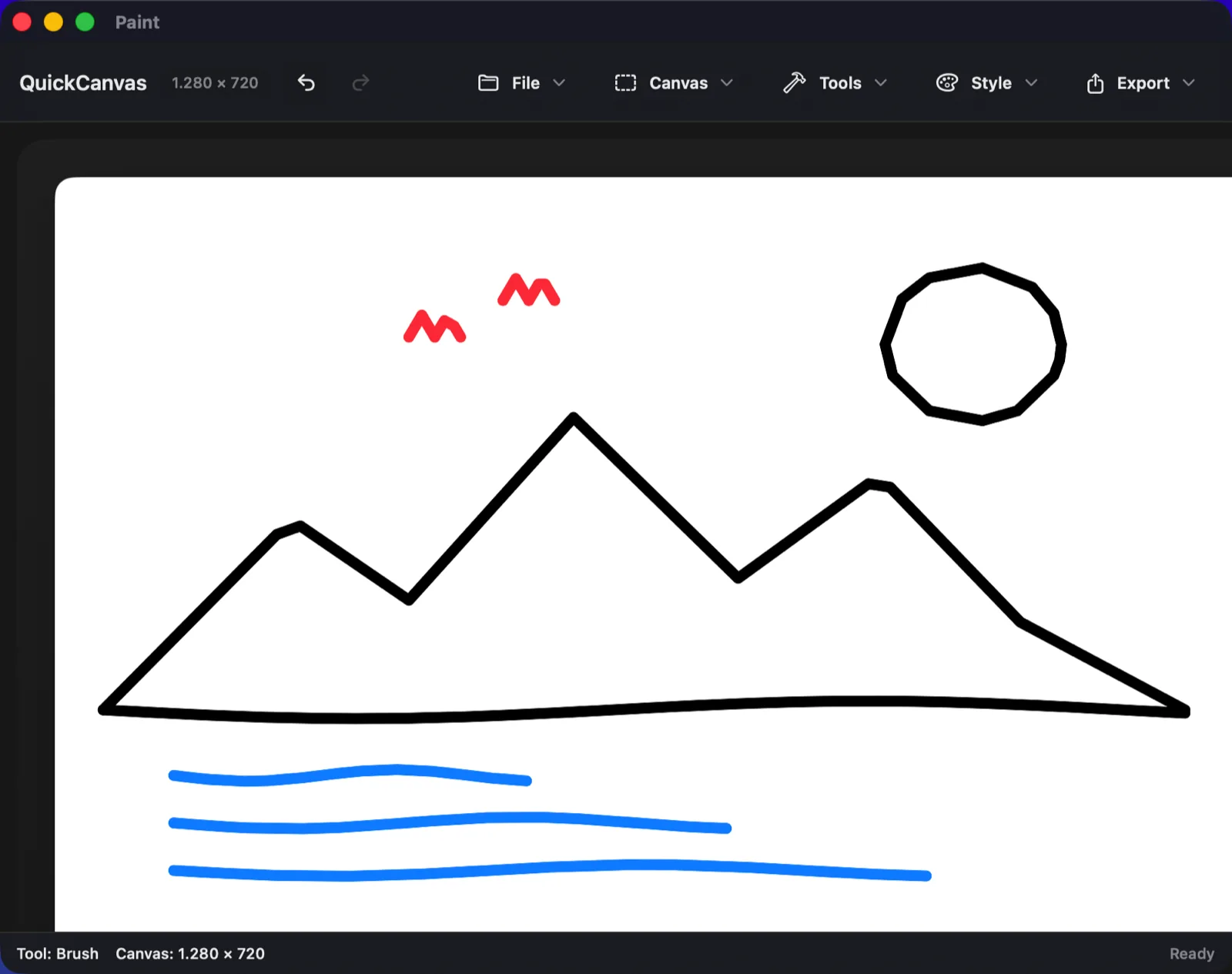
A drawing app in one window. Thirteen tools, a canvas, and an export button — nothing to set up before you start.
Tools
Thirteen tools
Pencil, brush, marker, highlighter, eraser, paint bucket and text — plus line, arrow, rectangle, rounded rectangle, ellipse and triangle.
History
Undo and redo
Every stroke and shape can be taken back. One exception: filling the background with the bucket sticks, so fill it white again to undo that.
Canvas
Canvas presets
1280×720, 1024×768, 1920×1080, 1080×1080, 1600×2000 — or type your own size.
Import
Open a photo, draw on it
Import PNG, JPEG, TIFF, GIF or HEIC, then either fit it to the canvas or resize the canvas around it.
Export
Export as PNG or JPEG
Save wherever you like. For JPEG you choose the compression quality yourself.
Colour
Colour to hand
A palette of ready colours, a size slider and a live pointer preview, all in one panel instead of a settings window.
Specifications
- Version
- 1.0
- Requires
- macOS 14 Sonoma or newer
- Processor
- Apple silicon (arm64)
- Download
- Paint-1.0.zip — 502 KB
- Signature
- ad-hoc, not notarised
- Network
- none — no networking code at all
- Built with
- Swift, SwiftUI and AppKit
- Source
- 1473 lines, one file
Sortly
Sorts a messy folder into folders — and can put every file back exactly where it came from.
Planning
Plan first, move later
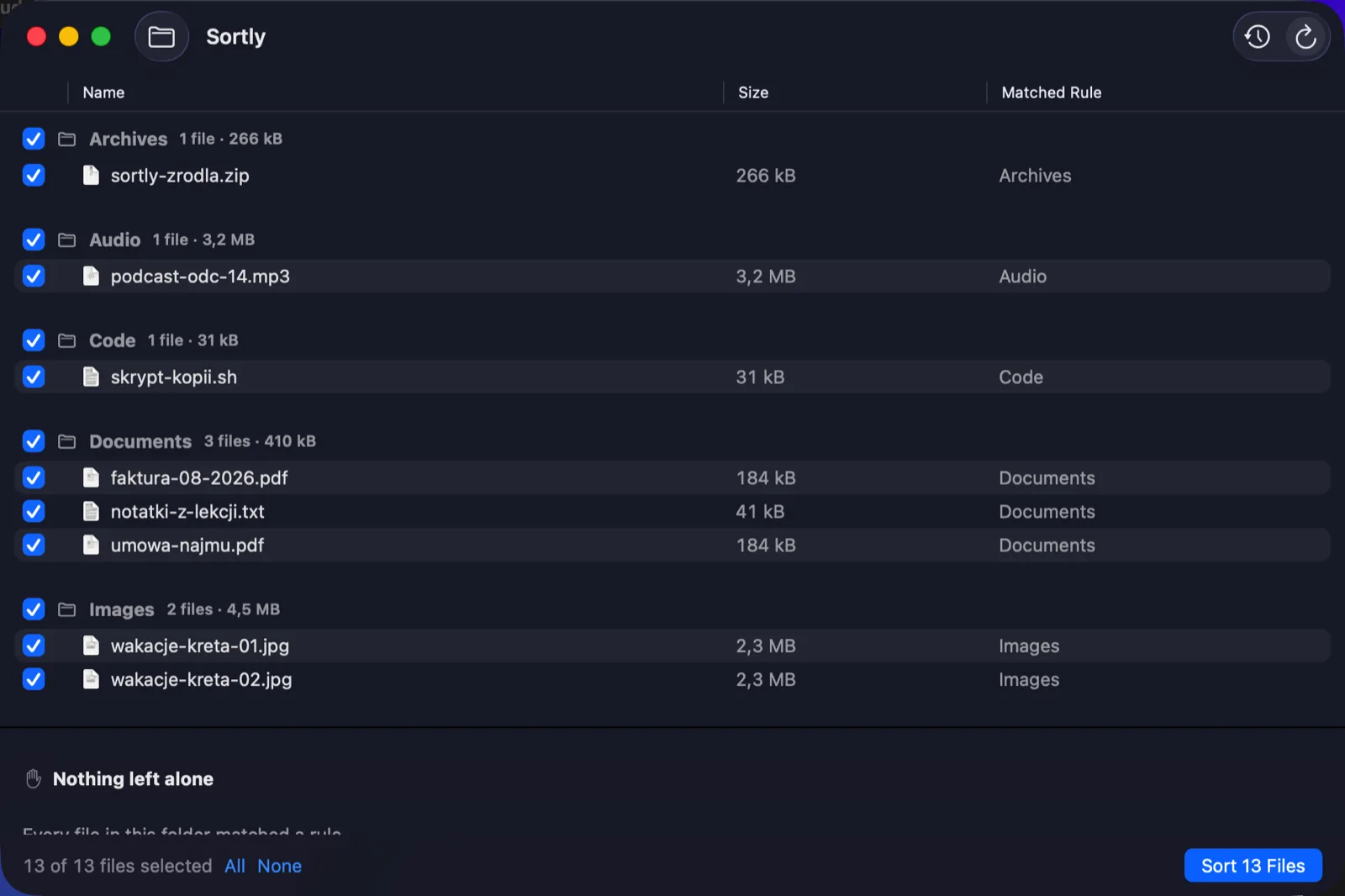
Point it at a folder and it shows you what would happen: every file, its destination, and the rule that picked it. Nothing moves until you press the button.
Undo
Undo the whole batch
Each run is written to a log. Ask for it back and every file returns to its original path, checked one by one before it is touched.
Safety
Never deletes, never overwrites
If a name is already taken it adds a number rather than replacing anything. Across drives it copies, verifies, and only then removes the original.
Skipping
Leaves the unclear alone
App bundles, half-finished downloads, aliases and iCloud files that are not on the disk yet all stay put — and it tells you why in its own pane.
Rules
Rules you can read
Screenshots, images, video, audio, spreadsheets, code, documents and archives. Anything that matches nothing is simply left where it is.
Privacy
Sandboxed by design
It can only see the folder you hand it, and it holds no network permission — which is checkable, not just a promise.
Specifications
- Version
- 0.1 (debug build)
- Requires
- macOS 14 Sonoma or newer
- Processor
- Apple silicon (arm64)
- Download
- Sortly-0.1.zip — 3.1 MB
- Signature
- ad-hoc, App Sandbox on
- Network
- no network entitlement
- Engine
- SortKit — Swift 6
- Log
- SQLite, stored locally
Aergonomic Code
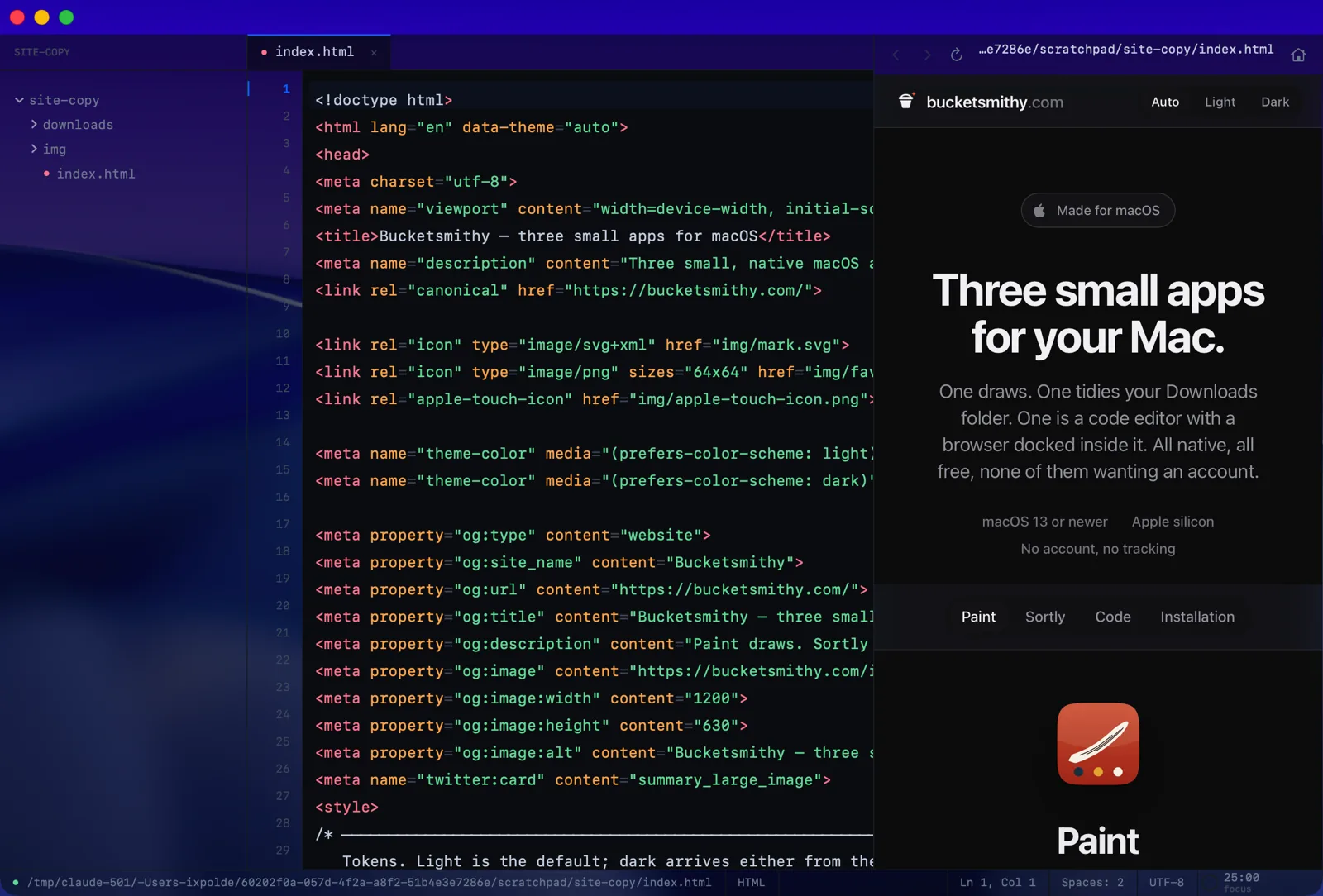
A code editor with a browser docked inside it. Write, run it, and see the result without leaving the window.
Editor
Native, not a web view
Built on TextKit: a real gutter, tabs, a minimap and a command palette on ⌘K. It opens instantly and stays out of the way.
Browser
A browser in the sidebar
Press ⌘⇧B and a real browser panel slides in: address bar that doubles as a search box, back and forward, and media that keeps playing while you work.
Preview
See the page as you write it
Run an HTML or CSS file and it renders in that browser panel, right next to the code that produced it.
Run
Run the file you are looking at
Python, JavaScript, PHP, Swift, C and C++ execute in place, with the output — and the exit code — in a pane under the editor.
Languages
Ten kinds of file
Highlighting for Swift, Python, JavaScript, PHP, C, C++, HTML, CSS, JSON and Markdown, with autocomplete drawn from keywords and from what you have already typed.
Status bar
A timer and a level meter
A pomodoro clock and a live audio meter sit in the status bar. Theme, accent, font size and window transparency all come from one plain text config file.
The browser
Yes, it really is a browser
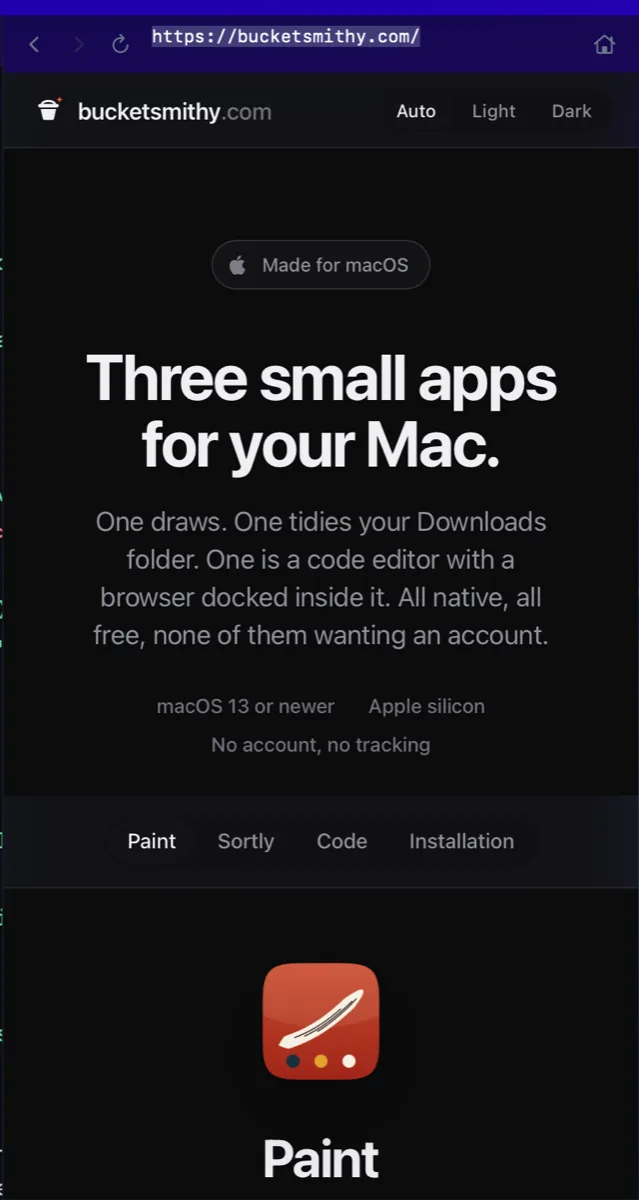
Not a preview pane — 230 lines of WebKit with an address bar that doubles as a search box, back, forward, reload and home, and a slim loading bar under the toolbar. That is bucketsmithy.com in the shot, fetched over the network from inside the editor.
It came from one request: somewhere to keep music and video while you work. So media keeps playing while you type in the pane next to it, and pressing Run on an HTML or CSS file loads that file here instead of going out to the web.
Show or hide it with ⌘⇧B. The Browser menu also has Focus Address Bar, and the command palette lists both.
Specifications
- Version
- 1.0
- Requires
- macOS 13 Ventura or newer
- Processor
- Apple silicon (arm64)
- Download
- AergonomicCode-1.0.zip — 1.2 MB
- Signature
- ad-hoc, not notarised
- Network
- the browser panel only
- Built with
- Swift, AppKit and WebKit
- Source
- 4779 lines, 26 files
- Settings
- ~/.config/aergonomic/config.conf
- Extras
- guided lessons, run history
Installing on macOS
All three are Mac software — they do not run on Windows, Android, or an iPhone. The whole thing takes about a minute.
-
Check that your Mac fits
Open the Apple menu in the top-left corner and choose About This Mac. You need two things:
- macOS 13 (Ventura) or newer for Aergonomic Code; macOS 14 (Sonoma) or newer for Paint and Sortly. The version is listed right there.
- Apple silicon — the chip line says M1, M2, M3, M4 or M5. On an older Intel Mac these builds will not open.
-
Download and unzip
Use the download button on any of the three app tabs. The file lands in your Downloads folder. Safari usually unzips it for you; in other browsers, double-click the ZIP.
-
Move the app to Applications
Drag
Paint.app,Sortly.apporAergonomic Code.appinto your Applications folder. This is not strictly required, but it keeps the app from being deleted with the rest of your downloads. -
Open it the first time
macOS blocks unknown apps on first launch — see the note below for why. Getting past it depends on your macOS version:
- macOS 15 Sequoia and newer: double-click the app and let it get blocked. Then open System Settings → Privacy & Security, scroll to the bottom, and click Open Anyway next to the app's name.
- macOS 14 Sonoma: right-click (or Control-click) the app, choose Open, then click Open again in the dialog.
You only do this once per app. After that it opens like any other program.
-
If macOS still refuses
Files that travelled through a browser or a messaging app carry a quarantine flag. Clear it in Terminal, then open the app again:
xattr -dr com.apple.quarantine /Applications/Paint.app
xattr -dr com.apple.quarantine /Applications/Sortly.app
xattr -dr com.apple.quarantine "/Applications/Aergonomic Code.app"
Run only the line for the app you installed. Terminal lives in Applications → Utilities.
-
Let Sortly see a folder
Sortly runs in Apple's sandbox, so it starts with no access to your files at all. Click the folder button in its window and pick the folder you want tidied — that grant is the only thing it can ever read or write.
Why does macOS warn about these apps?
Apple's notarisation requires a paid developer account. These two are signed with a plain local signature instead, so Gatekeeper cannot look them up and asks you to confirm by hand. The warning is about the missing paperwork, not about anything found in the app.
If that bothers you, all three are small enough to read: Paint is a single Swift file, Sortly's engine ships with its test suite, and Aergonomic Code is 26 files of plain AppKit.
Removing them again
Drag the app to the Trash. Sortly also keeps a small log of what it moved, at
~/Library/Containers/com.draxic.Sortly — delete that folder too if you want
it gone completely.